Key Examples
What is a Key Example?
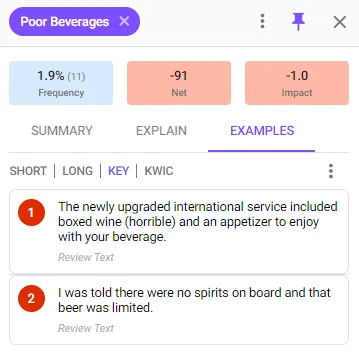
Key Example’s are example verbatim comments that are saved against a Report Insight. They are generally the best examples of that Insight but can also be used to highlight particular features of the Insight.
Where can I see Key Examples?
Key Examples are saved against Report Insights so are displayed whenever you:
- Preview a Report Insight
- View a Report Summary

How do I add Key Examples to my Reports?
- Select a Report Insight from anywhere to preview it
- Select the Examples tab
- Find the example you want to add using the ‘Short’ or ‘Long’ view mode
- Select the example and click the ‘star’ icon to the right side of the example, the ‘Add key example’ popup will display
- Edit the text selection or leave it as is
- Select ‘ADD EXAMPLE’ to create the key example
How do I edit Key Examples?
- Select a Report Insight from anywhere to preview it
- Select the Examples tab
- Select the ‘Key’ mode at the top of the Examples tab
- Find the Key Example you want to edit, select it and click the edit icon or click the star icon to remove it as a Key Example.
Note: The top Key Example in each report category is displayed directly in the Report Summary. Drag the examples up and down in the ‘Key’ view to reorder them.