Search Term Expressions
Search Term Expressions enable you to create granular filters by combining search terms with boolean and linguistic operators.
For example if you want to match verbatims containing the word ‘manage’ AND ‘payment’ you can enter the expression ‘manage + payment’.
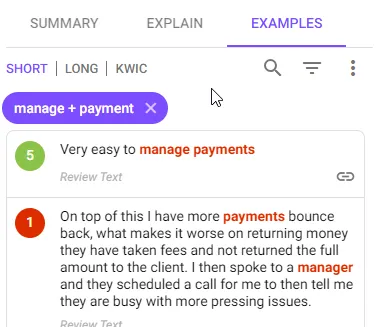
Where you use them
Search term expressions can be used wherever you can use search terms:
- Filters
- RHS Examples Filter
- Report Categories and Aspects
How to create them
- Simply click on the search (magnifying glass) icon and enter a search term expression
- Once you hit Enter (or click + in some cases) a purple filter chip will be created
- Once created you can remove this chip or drag it to other controls e.g. Filter or Analysis Category
Search Term Operator Syntax
Search Expressions can include the following operators:
Basic Terms
| Operator | Symbol | Usage/Example |
|---|---|---|
| Word | To match a word enter the word in lowercase. Note that:
Matches: “payment” or “payments” Example: “payment screen” Matches: “payment screen”, “payments screen”, “payment screens”, etc. | |
| Phrase | ” “ ~n | Basic Phrase To match a multiword phrase enter the phrase inside double quotes Example: “payment screen” Matches: all occurrences of the word ‘payment’ followed by ‘screen’ e.g. ‘payments screen’, ‘payment screens’ etc Near Phrase Modifer If you add ~n (for any number greater than zero), then it will match even if there are n other words inbetween your phrase words. Example: “payment screen”~1 Matches: ‘payments entry screen’, ‘payment or screens’ etc |
Combining Multiple Terms
You can combine multiple terms using brackets and the OR, AND and NOT operators
| Operator | Symbol | Usage/Example |
|---|---|---|
| AND | + | If you require two or more terms or expressions to ALL match, then put the + operator between the terms Example: payment + screen Matches: Any text that contains BOTH ‘payment’ and ‘screen’ So this would match a sentence such as ‘I like payments but hate the statements screen’ |
| OR | | | If you require AT LEAST ONE of the terms to match, use the | operator between the terms Example: payment | screen Matches: Any text that contains EITHER ‘payment’ or ‘screen’ or both Note: This is the default operator for multiple terms. So if you specify more than one term and do not specify a + or a | between the terms - then OR will be assumed. |
| NOT | - | If you want to match text that does NOT contain a term, then use the - operator directly before the term Example: payment -screen Matches: Any text that contains ‘payment’ but does NOT contain ‘screen’ Note: If you are using the NOT operator you likely intend to match something like: A AND NOT B. So you need to define this as: A + -B. If you leave out the + it will be interpreted as: A OR NOT B which is likely not what you intended. |
Nesting and Grouping
| Operator | Symbol | Usage/Example |
|---|---|---|
| Grouping | ( ) | You can group multiple terms into brackets to control the order of evaluation Example: (large | big) + (car | vehicle) |
| Nesting | ( () ) | You can nest brackets Example: ((large | big) + (car | vehicle)) | truck |