Sorting, Filtering and Exporting pattern summaries
An Ipiphany Discovery Analysis finds up to 100 patterns with the highest impact on your target metric and by default the patterns with the highest negative impact are displayed first.
Before you start to explore individual patterns get a quick high level understanding by sorting the resulting patterns by
- Positive/Negative Impact – Reverse the order so that patterns with a positive Impact appear at the top
- Ascending/Descending Metric – Often the patterns that include verbatim Concepts or Themes are low frequency but capture a lot of root cause information and have extreme measure values. If you sort the patterns by the Metric column (ascending and descending) these patterns will appear at the top.
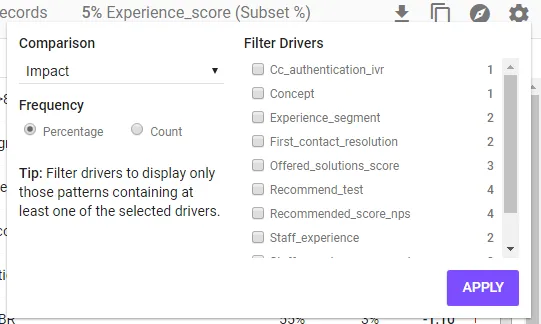
You can view a summary of the frequency of the drivers within the patterns by clicking on the cog symbol and viewing the counts associated with the drivers. To filter patterns to only those that contain specific drivers click on one or more of the driver attributes.
Tip – Click on the Export link to export the pattern summaries to Excel so that you can make notes against the patterns as you explore deeper.